I built a tiny macOS tool for the moment you quietly skip a word you are supposed to know. It is a menu-bar glossary: press ⌥Esc from anywhere, type part of a technical term, and it unfolds in four calm tiers — What It Is, Analogy, Why It Matters, Example. That is also the name. It is for anyone learning a technical vocabulary, in any language, who wants the lookup to cost a keystroke instead of a context switch.
The friction
Not knowing a term is not a failure. It is a snowball. One word you skip becomes two, and soon the paragraph is noise, and then you are nodding along to something you only half understand, and pretending you did not is a skill you get good at without noticing.
It is worse when English is not your first language. I say this as someone writing this post in English and thinking in another one. Technical vocabulary is already full of words with no plain meaning — now add to that the quiet shame of asking, and the fear that everyone else already knows. So you do not ask. You quietly skip, and the snowball grows.
I know exactly how that loop starts. I was trying to catch up with the big guys — reading the same blogs, the same threads — and I kept running into words I was supposed to know. Endpoint. API. Everyone threw them around like they were nothing, and I had no idea what either one actually meant. I had been building things for a while, and I still did not know what an endpoint was. I was too embarrassed to ask, because at that point, asking felt like confessing to a hole in the basics that I should not have.
And looking it up was no help. Open a browser, wade past SEO filler, skim a definition written for someone who already knows it — "an endpoint is a URL where an API can be accessed." Right. Thanks. Now I knew more words I did not understand, and I had lost the thread I was holding. The lookup cost more than the answer.
The idea
Make the cost of a lookup near zero — in time, in mouse travel, and in cognitive load. Make it safe to not know. The tool comes to you (global hotkey, overlay floats over your work without stealing focus), reveals just enough (one plain sentence first, deeper only if you press for it), and never asks for the mouse.
It is a small tool on purpose: not a dictionary, not a note-taking app, not cloud software. It assumes the learner, not the expert. That is the whole stance.
What it does
- Summons a centered overlay from any app with
⌥Esc(rebindable), or a compact Mini dropdown from the menu bar - Fuzzy-searches 147 built-in terms — AI/LLM, dev practice, data, security, web, systems — with frecency quietly floating your most-used terms
- Unfolds each term one
Spacepress at a time: What It Is, then Analogy, then Why It Matters, then Example.Escbacks out one layer per press;⌘Ccopies the term - Reads the clipboard on summon — copy "Docker" somewhere, press the hotkey, and Docker is already open
- Lets you edit the glossary as a plain JSON file, no rebuild; app updates merge new built-in terms without touching your edits
- Stays local: no account, no network, no telemetry
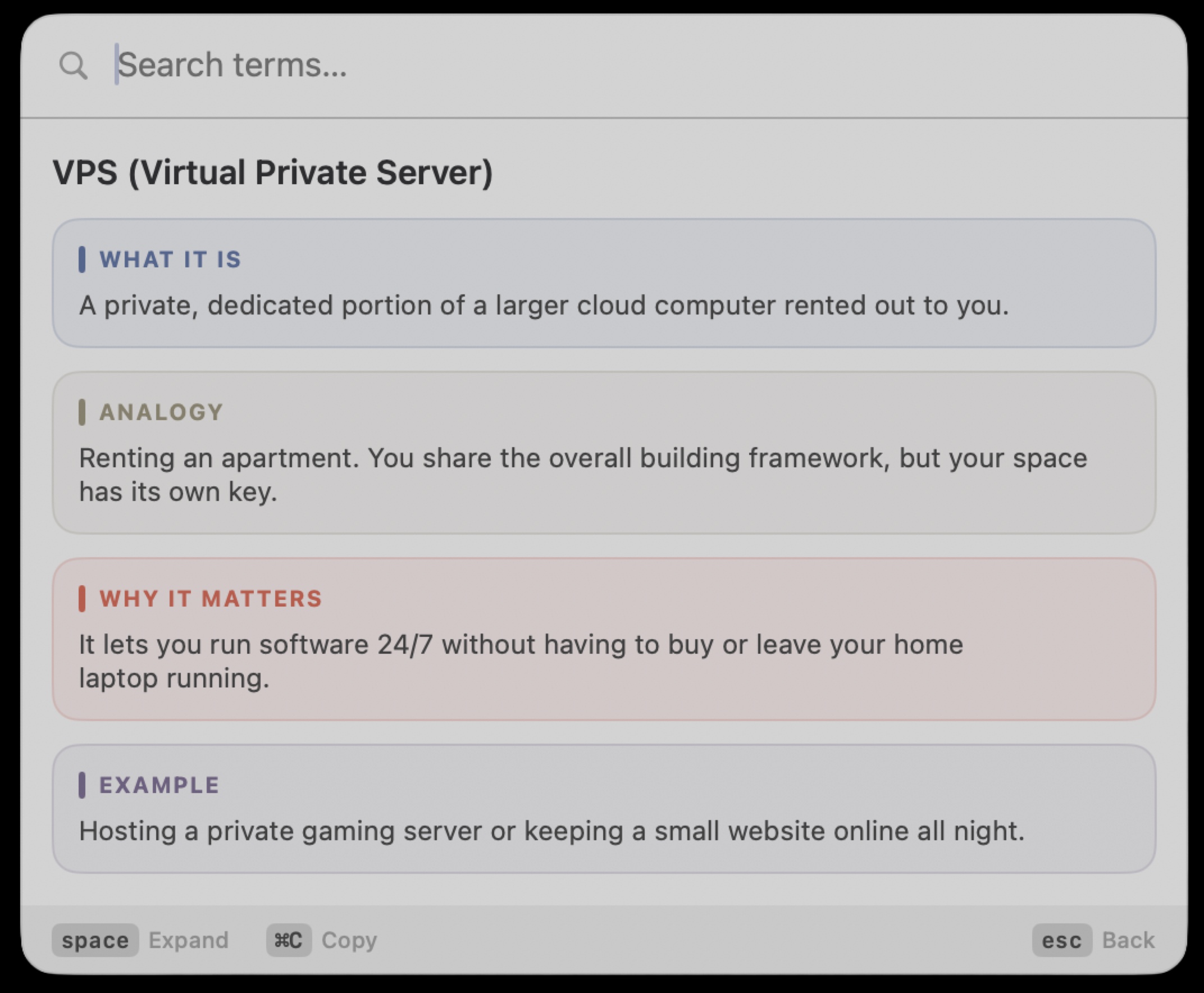
Space press each — What It Is, Analogy, Why It Matters, Example.Why I built it
I kept paying the same tax: half-knowing a term, going to look it up, and coming back without the thread I was holding. And I kept doing the thing I just told you about — quietly skipping a word rather than admitting I did not know it.
The honest version: I tried the hardcore route first. I sat down to properly learn — courses, tutorials, the whole "learning loop." And it felt like a punishment. Every video assumed I already knew the three things before it. Every article ended with more words I had to look up. I was trying to close one gap and opening three more, and the whole thing made me feel behind, not smarter.
So I stopped trying to catch up all at once, and I looked for the smallest useful thing: just know the word in front of me, right now, in plain language, without leaving my work. No course, no bootcamp — one term, one keystroke, one plain sentence, gone when I had enough.
Nothing I tried respected that moment. Search engines and documentation are written for people who already understand. So I built the tool around the moment instead.
How it works
The app lives in the menu bar as a background agent — no Dock icon. A Carbon global hotkey summons a floating panel that does not take focus from your work. On first launch it seeds an editable glossary file at ~/Library/Application Support/WAWE/glossary.json; from then on that file is the source of truth.
Typing filters with a subsequence fuzzy matcher; results are ranked by match quality first, usage second. The disclosure loop is deliberately small and keyboard-only:
- Summon. Press
⌥Escfrom any app; the overlay appears without stealing focus - Find. Type part of the term; fuzzy match ranks quality first, your usage second
- Unfold. Press
Spaceto step What It Is → Analogy → Why It Matters → Example;Escsteps back out,⌘Ccopies the term
The whole loop never touches the mouse, and everything the panel shows comes from the JSON you own. You never have to ask anyone anything.
One small thing I like: a capital W has exactly four strokes, and WAWE has exactly four tiers — so the app icon draws the W as four strokes, each in its tier's color.
Where it is now
Shipped. v0.2.0 is released as a signed and notarized DMG, installable directly or via Homebrew (brew tap aka-kika/wawe brew install --cask wawe). The core logic lives in a separate library with 49 unit tests.
Honest caveat: it requires macOS 26 (Tahoe) or later, on Apple Silicon.
Try it
WAWE is free and open source. If you are learning a technical vocabulary — in any language — it is the difference between leaving your work to look something up and getting the answer where you already are, without ever having to admit you did not know.
Try it
A keyboard-first menu-bar glossary that explains a term in four calm tiers — What It Is, Analogy, Why It Matters, Example. Free, open source, macOS 26+.