Every new project starts the same way. You make a folder, you copy in the files that set the rules, and you rename things so the project knows what it is. README, AGENTS.md, CLAUDE.md, TODO, SECURITY. The boring scaffolding that exists before any real work begins. I did this over and over, sometimes by hand, sometimes from memory, sometimes badly. The annoying part was that this is a thirty-second job I kept doing badly.
Seedling is a small macOS menu bar app that turns naming a project into a tiny ceremony. You summon a small centered window, type a name, and it plants your usual files into a fresh folder. That is the whole concept. The files are the seeds, the new folder is where they grow.
Seedling At A Glance
- What it is. A local-first macOS menu bar app for project scaffolding.
- What it creates. Fresh project folders filled from reusable Markdown seed files such as README, AGENTS, TODO, and SECURITY.
- Best for. People who start many projects and want the same starter files ready without copying boilerplate by hand.
- Source of truth. Seedling on GitHub
01: The Friction
The friction is not dramatic. It is just a small drag. You have an idea late at night, soft and unformed, and before you can work on the idea itself you have to do the scaffolding. Open a terminal. Copy boilerplate. Rename. Decide which files this project needs. It breaks the small bit of momentum that made you want to start in the first place.
- Opening a terminal to copy the same files you copied last time
- Forgetting a file and starting messy, then paying for it later
- The gap between wanting to start and actually being ready to start
02: The Idea
The idea is simple. Keep your seed files in one folder you own. Call it the Root. When you start a project, Seedling copies the current version of them into a new folder. The Root is the source of truth. The new folder is a clean beginning. Nothing more.
A small ceremony changes how a plain file copy feels, more than it should.
What It Does
Seedling does one thing and tries to do it well. You set two folders once: the Root for your seed files, the Garden for where projects live. After that, summon the window, type a name, and press return. Seedling creates the folder, copies the seeds in, and opens it. If a file already exists it is left untouched. The growth animation is only feedback, but it is the part that makes it feel like a beginning instead of a copy command.
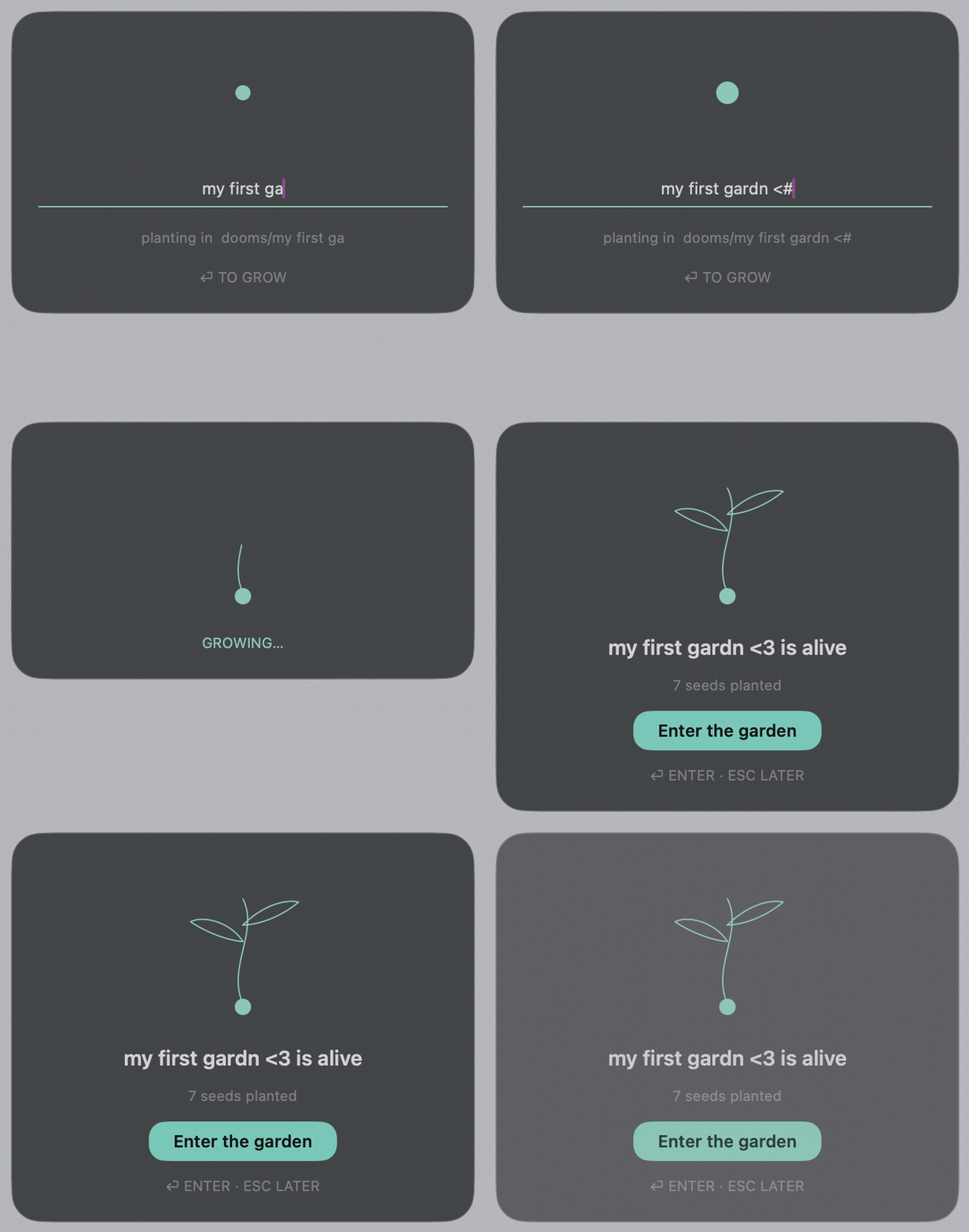
- Summon. Hit the hotkey or click the menu bar icon. A small centered window appears.
- Name. Type a project name. Seedling creates the folder and fills the project name into the files.
- Plant. Press return. Your seed files land in the new folder. Done.
03: What I Learned
Building something this small teaches you things you do not expect. Recent macOS injects a debug entitlement into release builds that breaks notarization, so the app has to be re-signed before it ships. The Settings window had to be managed by hand, because the standard SwiftUI opener no longer works for menu bar apps on current macOS. And the growth animation, which is just line art and a short timer, changes how the whole interaction feels. A small ceremony turns a file copy into a beginning.
The best part is not what it does. It is what it refuses to do. No templates to browse. No configuration to get lost in. No dashboard. One accent color, hairlines, and Liquid Glass. Name the thing. Plant it. Go.