I opened my GitHub stars and realized it was a graveyard. Hundreds of repos collected with real intent, buried in a flat, endless list I never reopened. Some I had cloned — most I hadn't — and I couldn't remember which was which. The ones I had cloned were scattered in random folders, slowly going out of date, with no quick way to see what I had or what I had forgotten.
reshelf is a small macOS app for the repos worth keeping. Paste a GitHub URL into Quick Capture, and it fetches the metadata and drops the repo into a local catalog, auto-categorized with no AI involved. From there, you sort it onto a shelf with a keystroke, clone it with a right-click, and the files land in a predictable folder organized by category. It is a librarian for your open-source habit, not a discovery feed.
What's on the shelf
reshelf has three shelves. Top Shelf is for the keepers — the repos you actively use or want close. The Collector is for the rest. Yard Sale is for the ones you are letting go. You sort with a keystroke. The sidebar filters by shelf, category, or Cloned, so you can see at a glance what you have and what you meant to clone and never did.
- Capture a repo by pasting its GitHub URL — reshelf fetches the metadata and auto-categorizes it with no AI
- Sort onto Top Shelf, The Collector, or Yard Sale with a keystroke
- Clone locally into
~/reshelf/repos/<Category>/<repo>, organized so a whole category is easy to hand to a coding agent
How it works
You paste a GitHub URL into Quick Capture (⌘K). reshelf fetches the repo's name, description, and license, guesses a category, and drops it into your catalog. The catalog lives in a SwiftData store at ~/reshelf/catalog.store with automatic JSON backups — it is just files on your Mac, nothing leaving the machine.
I wanted something closer to a shelf I could walk past: a clear view of what I'd kept, what I'd cloned, and what I'd meant to clone and never did.
Staying current
A read-only update check compares each clone against its upstream and flags the ones with changes to pull. You can pull one at a time or all at once.
- Capture. Paste a GitHub URL into Quick Capture (
⌘K). reshelf fetches the metadata and categorizes the repo automatically. - Sort. Move it to the right shelf with a keystroke. Filter the sidebar by shelf, category, or Cloned.
- Clone. Right-click to clone. The files go into
~/reshelf/repos/<Category>/<repo>, predictable and ready.
The part I did not plan
I built this to stop losing repos. What I actually use it for every day is something I did not design for.
Coding agents are least reliable at the thing I most want from them: using a library correctly. Ask one how something works and it answers from training data — at whatever version that was, blended with every similar library it has seen. That is why it calls methods that do not exist. Better prompting does not fix it, because the information is not in the room.
Having the source on disk does fix it. Because the clones sit somewhere predictable, an agent can read the real code of the exact version I have instead of remembering it. A skill ships with the app to do that: it maps what is on disk first, opens the files that answer the question rather than summarizing a README, and names the files and functions it took the pattern from so I can check its work.
Last week I was debugging a global hotkey that registered but never brought the window forward, and the agent confidently described an API that did not exist. The answer was already on my disk. I said "check my shelf" — it found two Swift repos of mine that solve exactly that, read the actual hotkey code, and showed me the line my version was dropping.
The licence became the interesting part
Then it said the useful thing. One of those two repos is MIT: adapt it freely, keep the notice. The other is GPL-3.0: read it, understand it, write your own.
Copying code is a licensing decision, and for years I made it by default — not carelessly, I just did not know, and finding out meant opening a LICENSE file and interpreting it myself. So reshelf explains every licence in plain language: what you can do, what you must do, whether it is safe in something closed-source, with a caution for copyleft. Plain language, not legal advice.
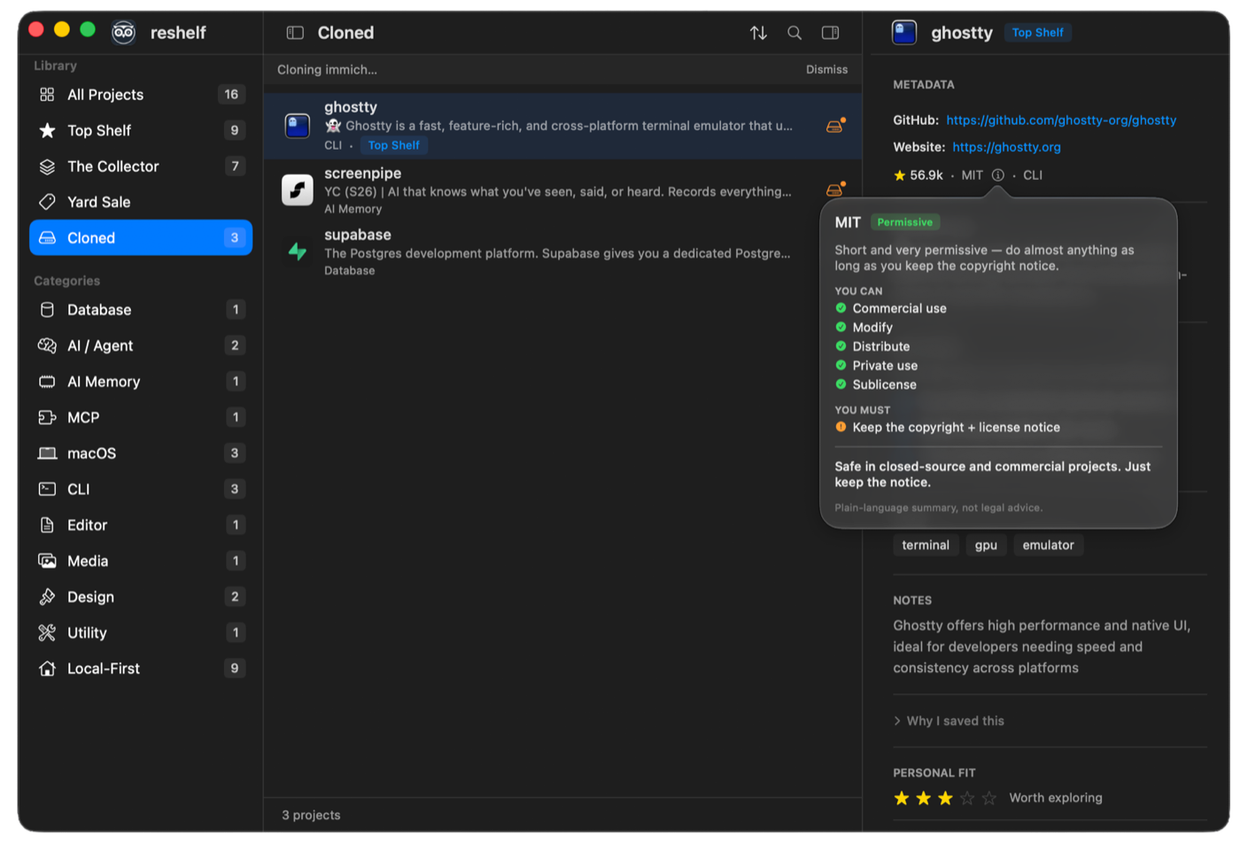
The skill reads that licence before it proposes you reuse anything, and closes every recommendation with two paths: learn the pattern, or use the code. Permissive means you can take the second. Copyleft means you take the first. The licence stops being something you check at the end and becomes the thing that decides how you are working.
Folders, because I overdid it
I cloned about a hundred repos for a single project and afterwards had no record of which ones belonged to it. A folder fixes that. It is yours to name, and separate from both the categories (what a repo is) and the shelves (how much you value it), because one project's repos span all of them. Deleting a folder only ungroups it: every project keeps its shelf, its clone, its notes. Deleting a container should never delete contents.
⌘-click gathers rows, ⇧-click takes a range, and then you can move them all to a shelf or retire the whole batch together. That is the other half of knowing what belonged together in the first place.
Where it is now
v1.9.0, and it is the app I open every day. It updates itself through Sparkle, and a shelf can move between Macs as JSON.
Earlier versions carried a v2 Intelligence preview behind a setting — clone analysis, compare, ecosystems. I removed all of it, seventy-eight files. It had been unreachable for two releases and I was keeping it out of reluctance rather than intent. The app is better as one clear thing.
macOS 14+, free, MIT. It cannot go on the App Store and never will: sandboxing forbids running git, which is the whole feature.
See it
A local-first macOS app for shelving the open-source repos you actually use — capture, sort, clone by category. Nothing leaves your Mac.