I run a lot of agents side by side: Claude Code, Cursor, Codex, Goose, Grok, Hermes, OpenCode. Each one loads its own MCP servers, the small programs that give an agent its tools. Between them that is about forty servers.
When one of those servers breaks, nothing tells you. The agent just has one tool fewer. It looks like the model is having a bad day, so you blame the model, rephrase the prompt, and move on. The server stays broken.
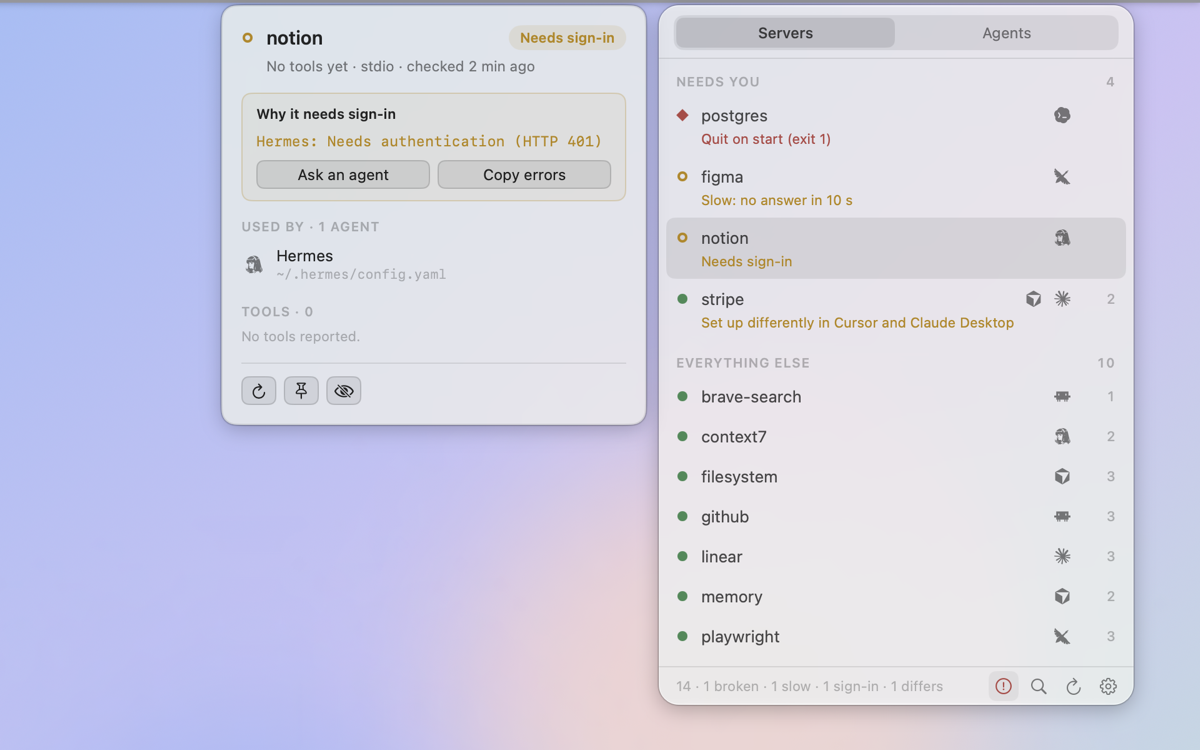
mcpock is a small menu bar app for the Mac that checks them for me. The name reads "MCP OK". It stays plain until something needs me.
The idea
Check the servers directly, the same way the agents start them, and put the answer in the menu bar. Not a dashboard I have to open.
It is small on purpose. It only reads. It never edits a config file.
What it does
- Finds the servers. It reads the config files of the agents it knows (Claude Code, Claude Desktop, Cursor, Windsurf, Cline, VS Code, Codex, Grok, Goose, Hermes, OpenCode and more), plus anything in a standard format that a scan of the usual folders turns up.
- Checks them. It starts each server the way its agent would and sees that it answers, on a schedule I pick.
- Sorts what it finds. Four plain states: broken, slow, waiting for a sign-in, or set up differently between agents.
- Counts each server once. Even when five agents declare it, and it names the agent that is the odd one out.
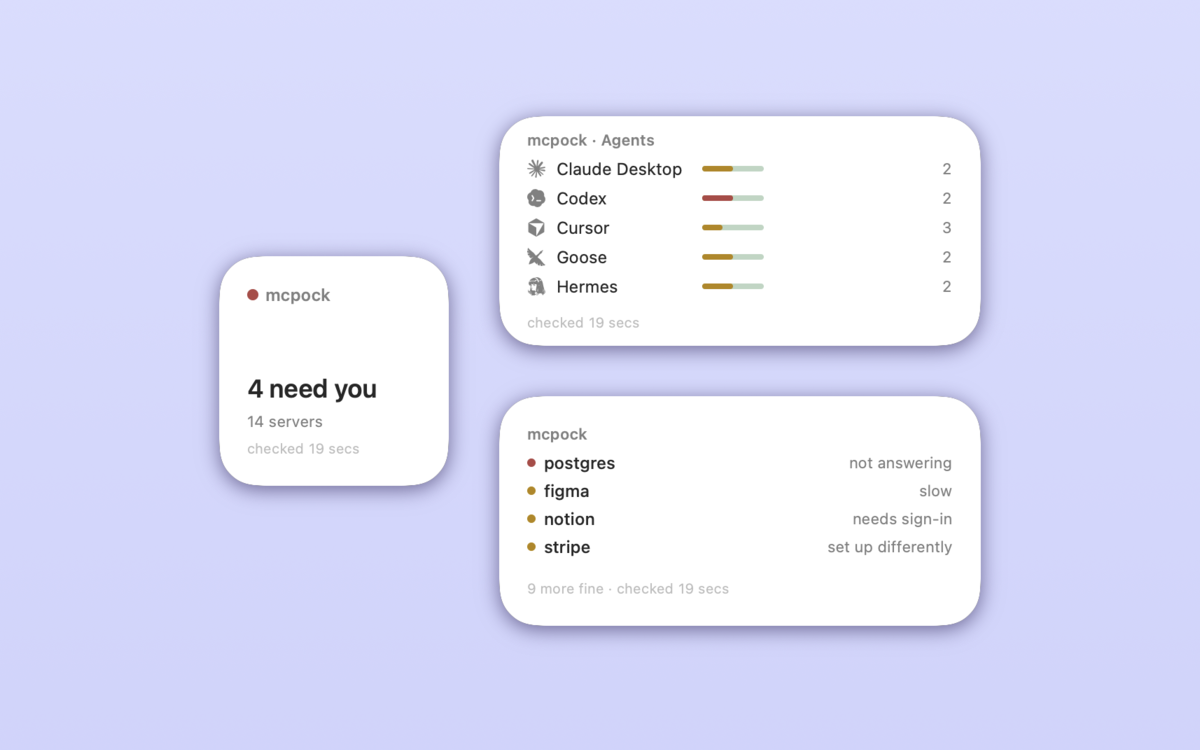
- Shows it on the desktop. Widgets for a status count, the problems list, and a small health bar per agent.
- Talks to agents. It ships a tiny MCP helper, so I can ask an agent "check my mcpock" and get the list of problems with the config file paths, ready to fix.
- Hides secrets. They are masked everywhere it shows or stores anything.
Why I built it
The first run was a game changer. So many hidden errors surfaced.
Servers that never started. One waiting for a login I had forgotten about. The same server pointing at an old build path in one agent and a new one in the others. None of it had ever shown up anywhere. The agents had been working around missing tools for weeks, and I had been blaming them for it. One early run found 11 of 48 servers needing attention.
That run also taught the app something. Probing forty real servers in one go surfaced three crashes in mcpock's own message reader that no test had found. Real servers print banners, logs and half-finished lines. A tool like this has to survive all of it.
How it works
mcpock reads the agents' config files (JSON, TOML and YAML) from my home folder, never from Documents, Desktop or Downloads. For each server it either starts the command the agent would start and speaks MCP to it, or calls its URL over HTTP. It asks the server to introduce itself and list its tools, then stops it again, including any child processes it started.
The results go to the menu bar panel, to the widgets, and to a small status file on my Mac that the MCP helper reads. Nothing leaves the Mac except the checks to my own servers and a check for new versions of mcpock itself.
A few things mattered more than I expected:
- "Set up differently" is the sneaky one. A server can look fine while one agent quietly runs an old copy of it.
- False alarms are worse than no alarm. Version 1.9.0 mostly fixed those. It runs Claude Code's header helpers for servers that sign in that way, gives slow starters a second chance, and stops caring which folder
npxlives in. - Some differences are meant. When agents are supposed to differ, each with its own key and launcher, I can mark that as intended, per agent, and it stops counting.
What I learned
- A missing tool is invisible. The agent works around it, and the problem looks like the model.
- Real servers are messy. They print banners, take nine seconds to wake up, renew logins in the middle of a check. The checker has to be patient and forgiving before it is strict.
- Read-only is a feature. Because mcpock never touches a config, I trust it on every machine.
Where it is now
Version 1.9.0 went out on 10 October 2026 as the first public release. It is free, open source under MIT, and signed and notarized by Apple. It updates itself through Sparkle, its one dependency. It started in July 2026 as MCPBAR and was renamed mcpock in September.
It needs macOS 26 or later on Apple Silicon. It is not on the App Store, because the sandbox would stop it from starting servers and reading other apps' config files.
Next: widgets that refresh right after an update (1.9.1), and usage counts for more agents, meaning how often each server is actually called.
Install with Homebrew: brew install --cask aka-kika/tap/mcpock, or download it. Site: mcpock.com.