Every screenshot I liked, I wanted the colors out of. So I'd sit with the eyedropper at midnight, lifting hex codes one at a time — which is not a personality, though I was doing my best to make it one.
Color Palette Extractor is a small MCP server that does the whole job in one call. Hand it an image and it hands back a color system — the palette, a matching dark and light theme, contrast scores, and tokens you can paste into CSS, Tailwind, or Figma. It runs on my machine and the picture never leaves it. A tool for getting colors out of images, not a design app.
01: The Itch
Picking colors out of a screenshot is fine once. Doing it for every app and mockup — pick, build the opposite theme by hand, check the contrast, then write the same five colors into four tools that each want them slightly differently — is the small chore that quietly eats the afternoon you meant to spend on the actual work.
And screenshots fight back. Sample the whole image and half your palette is the wallpaper behind the app — a lovely portrait of my desktop, useless as a theme.
- Eyedropping the same colors by hand, one hex at a time
- Guessing the dark theme and hoping the contrast survives
- Writing one palette four times, for four tools with four opinions
02: Under The Hood
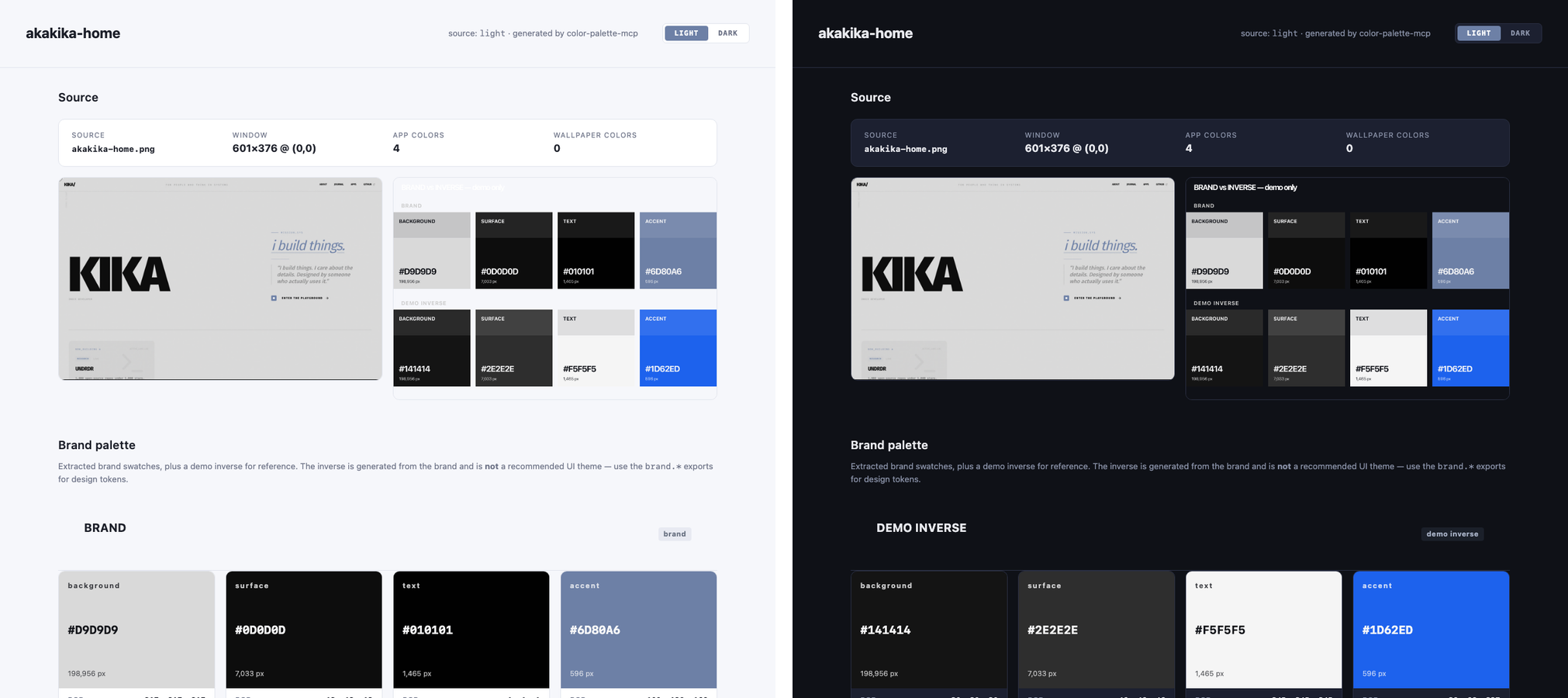
Here is the part that is just math. For a screenshot it finds the app window and cuts out the wallpaper, so the palette is the app and not the desktop behind it. It clusters the colors, assigns roles — background, text, accent, surface — and builds the inverse theme by flipping lightness while keeping the hue. It scores every text-on-background pair against WCAG, then writes the result six ways: CSS, SCSS, Tailwind, Figma tokens, JSON, and an Adobe swatch. Last it renders a small HTML guide — palette, contrast table, a dark and light toggle — and screenshots it.
A palette is just colors. A system is colors that already know what they are for.
The one-call version
Nine tools, but I only ever reach for one. The rest are there for when I want a piece on its own.
- Point. Give it an image, a local path or a URL.
- Extract. It finds the app, pulls the palette, builds both themes, scores the contrast.
- Take the folder. Previews, tokens in six formats, a README, and the HTML guide. One call, one folder.
03: Where It Is Now
I built the first version with goose in an evening, and it worked. Then I asked another agent to try to break it, and it found three ways in before I had finished my coffee: a way to run commands through the output path, a way to slip a script into the HTML guide, a way to make it fetch things it should not. None of it mattered on my own machine. All of it would matter the second it ran on something I did not write. So I closed the holes, added tests, and shipped v0.5.0. goose builds, another model breaks in, I clean up — apparently this is a code review now.
There is no AI inside the tool, by the way. It is clustering and contrast formulas — arithmetic old enough to collect a pension. The agents just press the button.
It is installed across the tools I use, it is not on npm yet, and the Adobe swatch export still needs a look. Small on purpose. It will not pick colors better than you can. It just will not make you do it by hand.
See it
A small MCP server that turns an image into a color system — palette, themes, contrast, tokens. Local, one job, open source.