My iPad stopped being a screen. It is a tool on the desk now, like the mouse and the keyboard.
It started with the gaps. An agent run takes a few minutes, and I used to spend them badly: watching the terminal, or clicking around the same screen the agent was changing. Then the run finished and I needed the right next prompt, fast. Review what changed. Look for regressions. Keep the fix from growing into a refactor. Those prompts lived in old chats, scattered notes and my memory, and I rewrote them every time, a little worse each time.
So I wrote them down properly, one file each, and put them on the iPad.
The idea
The Mac is where the work happens. The iPad is where I pick the next move.
While the agent works, I browse the library on the iPad, find the prompt the next step needs, and tap copy. Apple's Universal Clipboard does the rest: it is already on the Mac's clipboard. When the run ends, I paste. No window switching, no searching through old conversations while the agent waits.
That changed how I think about the iPad. Not an extra monitor, not a remote into the Mac. A control center that sits next to it.
The iPad is not a second screen. It is the drawer where the next move waits.
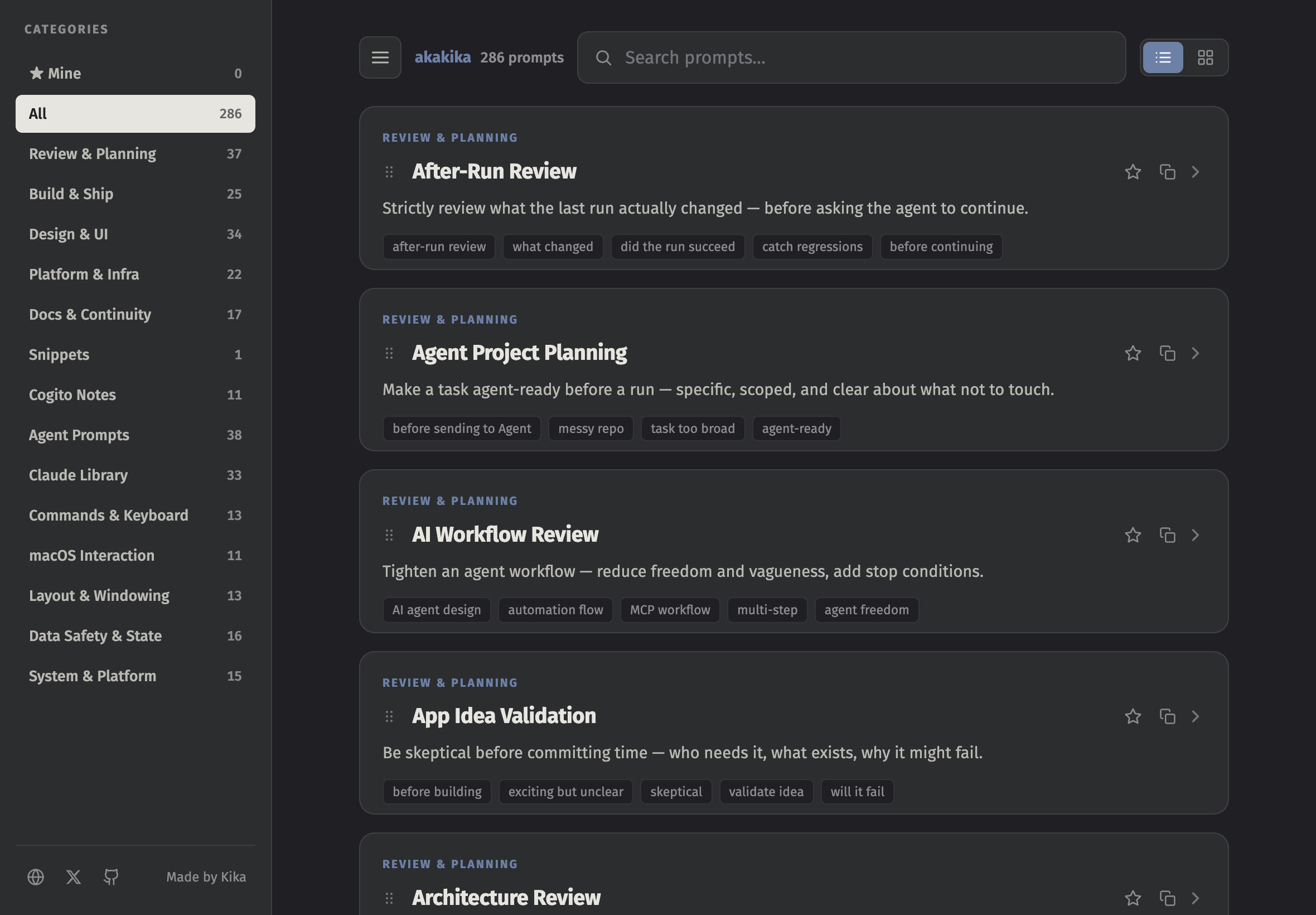
What it does
- 286 prompts, 14 categories. Review and planning, build and ship, design and UI, commands and keyboard, macOS interaction, layout and windowing, data safety and state, docs, and more. Each has a one-line description, when to use it, and the words I would search for.
- One tap to copy. The prompt, or one of its variations. A small count shows which ones I really use.
- Mine. Star a prompt and it collects there, with the ones copied most. Saved in the browser, nowhere else.
- Search that knows the situation. "Stuck for hours", "before release", "too many tabs" find the prompt written for that moment.
- On the Home Screen. Add it once on iPad or iPhone and it opens like an app, full screen, dark.
- Readable by agents too. Every prompt is also plain Markdown at /prompts/prompts.md, so an agent can take the whole library as context.
How it is made
Each prompt is a small Markdown file: a category, a few search words, a one-line summary, and the block to copy. A build script compiles them into one self-contained HTML file. No server, no account, no tracking. It lived on my iPad and a private page for three months; now it lives at akakika.com/prompts.
The prompts are strict on purpose. Most of them tell the agent what not to do: do not refactor, do not rename, do not assume the run succeeded, report before deleting anything. That is the part I kept retyping.
Where it is now
286 prompts: 153 from June, 133 more from July. Free and open, and still growing whenever I catch myself typing the same instruction twice.
If you work with coding agents and have an iPad on the desk, try it next to the Mac for a day. Copy on one, paste on the other.
Prompt Library
286 prompts for working with coding agents. Free, no account, and it installs to the Home Screen.